Where to Put a QR Code So People Actually Scan It
Placement decides scan rates more than design does. A beautiful code in the wrong spot gets ignored, and a plain one in the right spot gets used all day.
The MyPersonalQR team2 min read · 23 October 2025 · Practical
Picture a QR code on the side of a delivery van. It took ages to design, and it looks wonderful. Nobody will ever scan it.
That isn't because the code is bad. The van is moving, the person reading it is driving, and nobody has a spare moment.
People scan a code when three things are true at once. They can reach it, they have a reason to, and they have a moment to spare.
Attention is the thing you are short of, not visibility.
Put it where people are already waiting
Waiting is the best moment there is. Somebody sitting at a table, standing in a queue, or in a waiting room has time and nothing to do with it.
That is why a code on a table tent beats the same code on a billboard by a huge margin.
- Tables and counters
- Queue barriers and waiting areas
- Receipts, handed over at the end
- Packaging, opened at home
- Shop windows, read while closed
Get the height and angle right
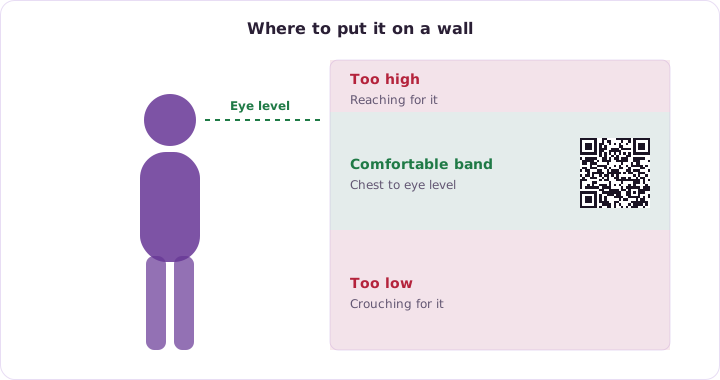
A code below knee height or above head height means crouching or reaching, and people won't do either for a poster. Roughly chest to eye level is the comfortable band.
Flat surfaces beat curved ones. A code wrapped around a bottle or a pole stretches, and a stretched code is a code that takes three tries.
Say what it does
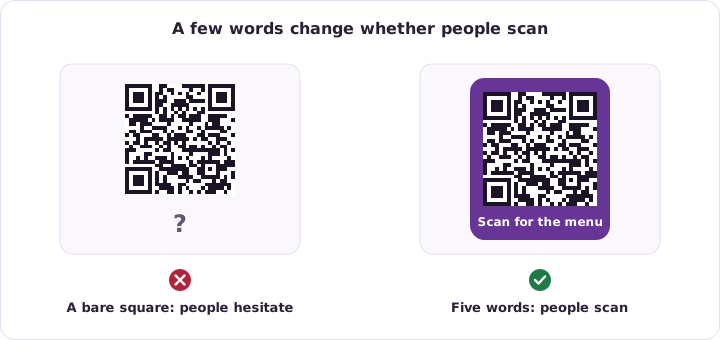
A bare square is a question mark. People have learned that scanning something unlabelled can lead anywhere, so plenty simply won't.
Four or five words fix it. Scan for the menu. See the full spec. Join our Wi-Fi. Tell people what they get and the hesitation disappears.
- Use a frame with a short caption
- Say the benefit, not the mechanism
- Keep it to about five words
- Match the wording to the destination
Give each placement its own code
If you put the same code on a poster, a flyer and your packaging, the scan numbers arrive as one lump and tell you nothing about which one worked.
Give each placement its own code pointing at the same page. It costs nothing and turns a vague total into a real comparison.
Check it survives the real world
A code that works in the studio can fail in the real place for reasons that have nothing to do with the design.
- Glare from a window or a spotlight
- A dim corner with no light at all
- Wear on a sticker touched all day
- Something parked in front of it
See how this applies to Retail & Products.
Try it on a code of your own. It takes a few minutes.